How Do I Cancel An Order?
Last updated: October 15, 2026
You can cancel an order in two ways: your team changes its Order Status to Cancelled in Tonomo, or the customer cancels it themselves from their order status page with Cancel Booking. Cancelling is more than a label. Tonomo deletes the order's calendar events (straight away, or after asking you), deletes the order's Dropbox RAW and final delivery folders, emails your business a cancellation notice and, if you've switched it on, emails the customer.
At a glance
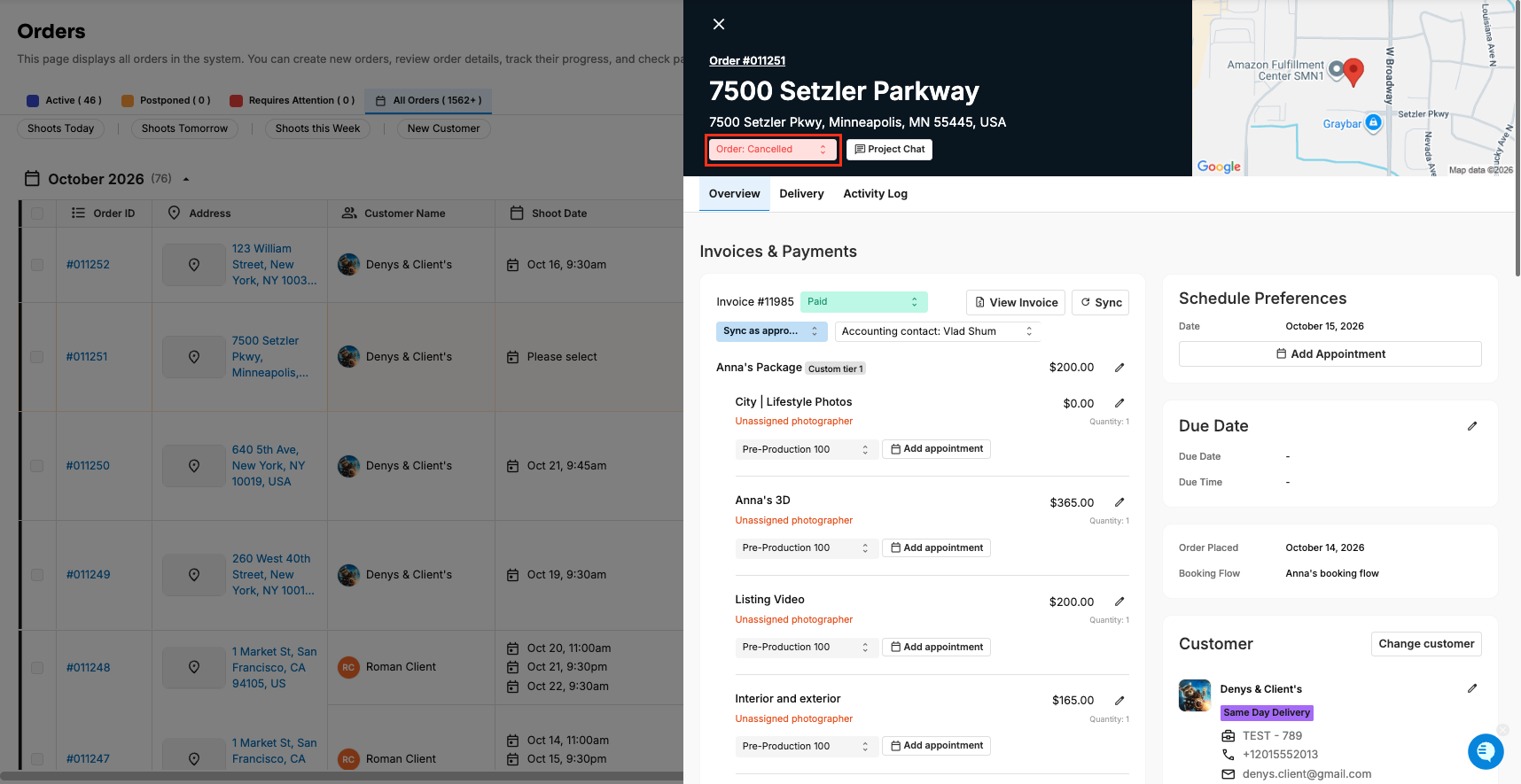
Admins: set Order Status to Cancelled on Orders (Beta), in Order Details, or for several orders at once with the bulk status menu.
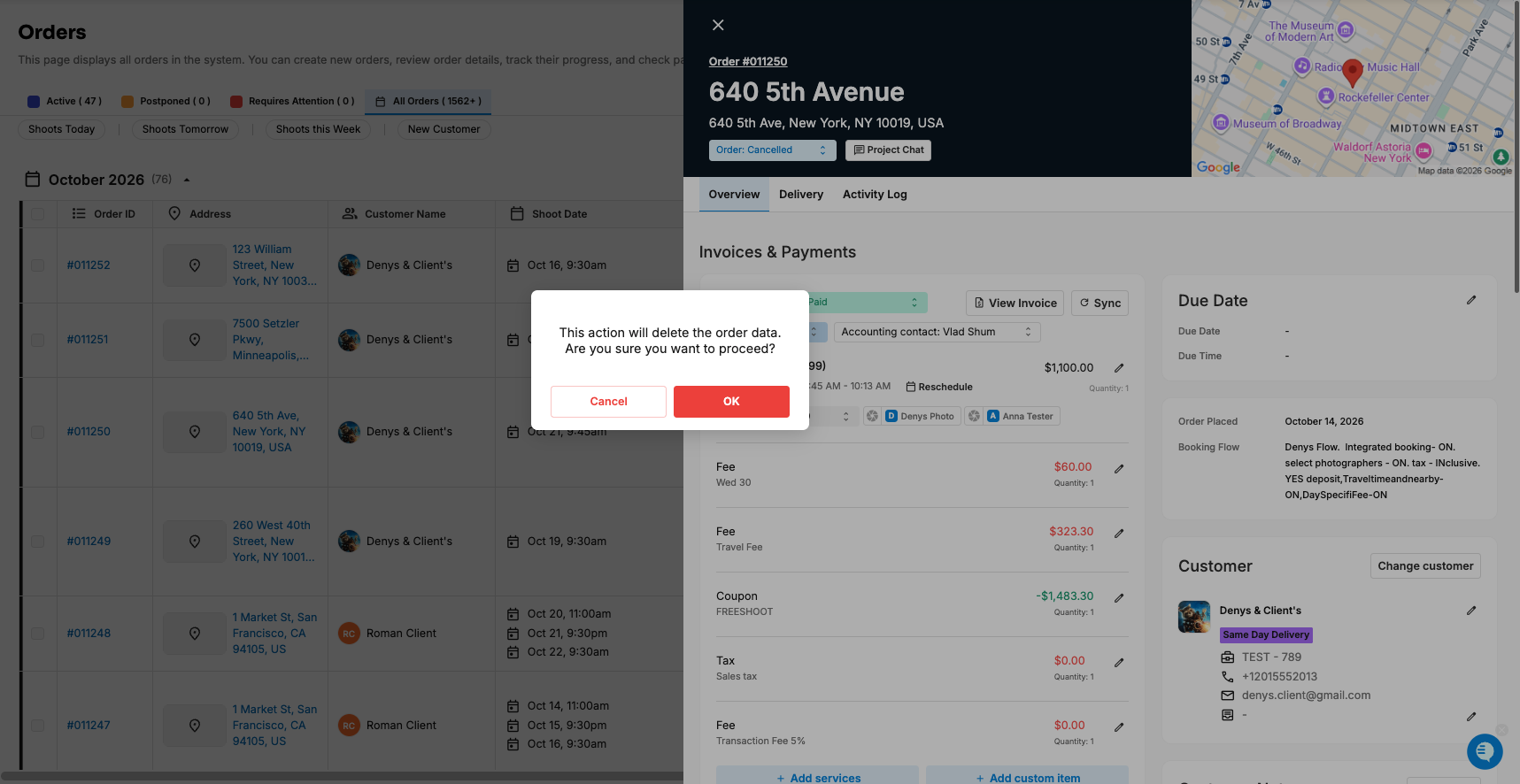
Tonomo asks you to confirm first: "This action will delete the order data. Are you sure you want to proceed?" Click OK to cancel, or Cancel to leave the status as it was.
Then, if the order has a calendar event, Tonomo asks, "Delete calendar events associated with order?". Switch on Automatically delete calendar events to skip that question.
Customers can cancel from their order status page only if the booking flow has Allow cancellation on, before your cut-off, and while the order is Pending or In Progress.
Cancelling deletes the order's Dropbox RAW and delivery folders. Download anything you need first.
Your business always gets a "has been cancelled" email. The customer gets one only if Send appointment canceled email is on.
To undo a cancellation, set the status back to In Progress and book a new appointment.
How do I cancel an order as an admin?
From the Orders (Beta) list
Go to Orders Management > Orders (Beta).
Find the order, and in its Order Status column choose Cancelled.
In the confirmation, click OK.
If the order has a calendar event, Tonomo asks Delete calendar events associated with order? Click OK to delete it, or Cancel to keep it. (You won't see this question if Automatically delete calendar events is on. Tonomo deletes the events without asking.)
From Order Details
On Orders (Beta), click the order's Order ID to open Order Details on the right.
In the order header, change the Order Status to Cancelled.
Confirm with OK, then answer the calendar event question as above.
For several orders at once
On Orders (Beta), tick the orders you want to cancel. A bar appears showing how many are Selected.
In the bar's status menu (it reads Mixed order statuses when the orders have different statuses), choose Cancelled.
Tonomo asks you to confirm each order in turn, and then asks about each order's calendar events. Click OK for each one you want to cancel.
When it's done, Tonomo shows a message like "Successfully changed the Order Status of order 1042, 1043 to Cancelled."
Tip: Archive in the same bar is different. It moves the orders to Archived Orders instead of cancelling them.
What does "delete the order data" actually delete?
The order itself stays in Tonomo with the status Cancelled. You can still open it, see its invoice and chat, and restore it later. What goes:
What | What happens when the order is cancelled |
|---|---|
Calendar events | Deleted if you click OK on the calendar question, or automatically if Automatically delete calendar events is on. Both the team's event and the customer's copy are removed, so attendees get a cancellation notice from their calendar provider. The photographer is taken off the order. |
Dropbox folders | The order's RAW and final delivery folders are deleted from your Dropbox, and their links are cleared from the order. This happens whatever you answer to the calendar question. |
Jobs | Existing jobs stay. Tonomo posts "moved the order … to Cancelled" in each job's chat and notifies the job's members. Jobs that were set to be created automatically later are called off. |
Video projects | The order's video status changes to Cancelled. |
Project Chat | Tonomo logs "changed the order status to Cancelled". |
Invoice | Not voided. It stays on the order with its payment status unchanged. Refund or adjust it yourself if needed. |
If you click Cancel in the first confirmation, nothing changes. The order keeps the status it had before.
How do I skip the calendar event question?
Go to Configure Booking > General.
In the Scheduling card, find Automatically delete calendar events ("Automatically delete calendar events when an order is postponed, cancelled or archived.").
Switch on Enable and click Save.
From then on, cancelling, postponing, or archiving an order deletes its calendar events without asking. This setting only shows when Integrated Booking is on.
How do customers cancel their own booking?
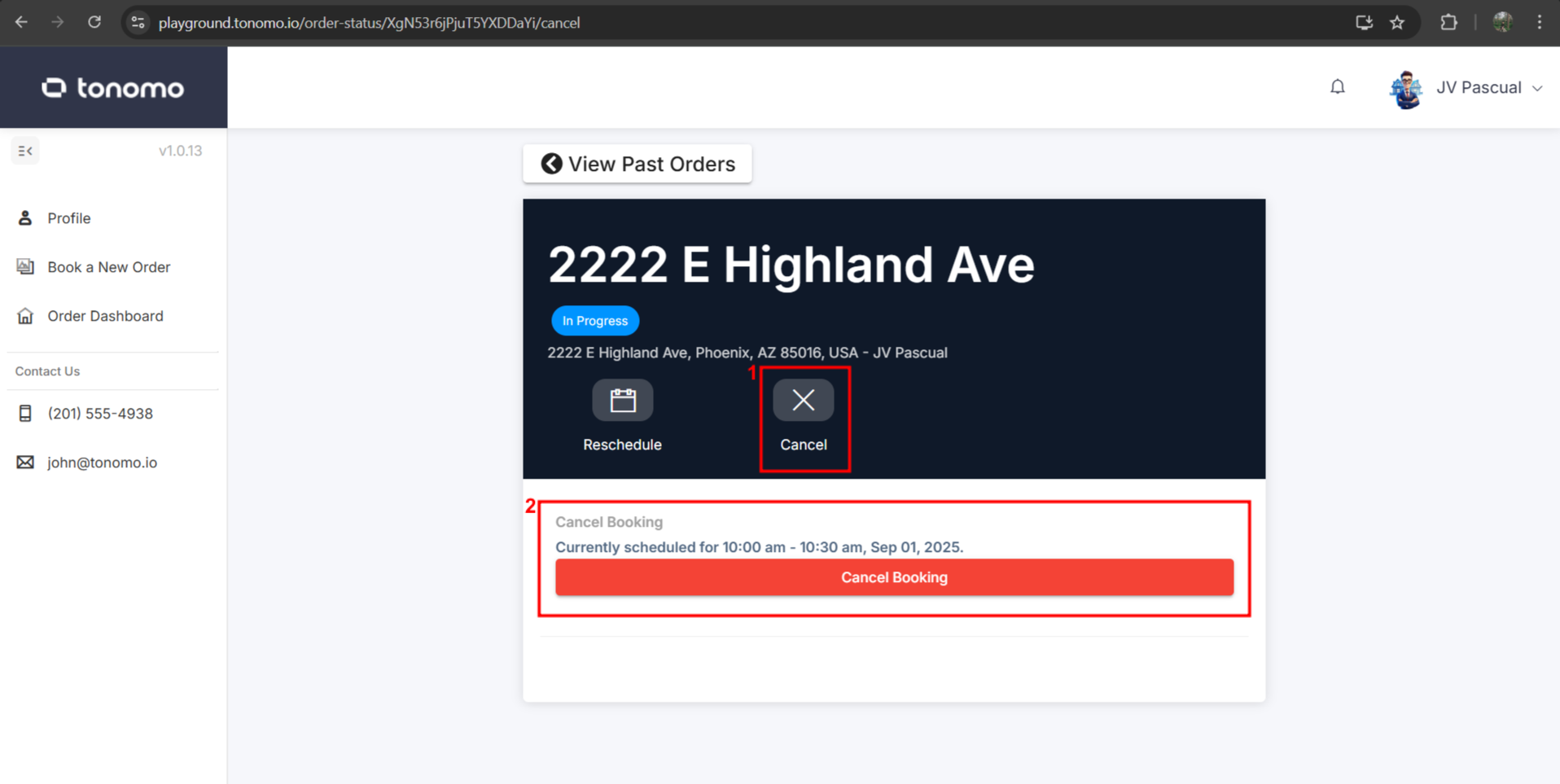
The customer opens their order status page, for example from their booking confirmation email.
They click Cancel.
They see Cancel Booking with their current time ("Currently scheduled for…") and click Cancel Booking.
Tonomo shows "Your booking has been cancelled."
The Cancel option only shows when all of these are true:
The booking flow has Allow cancellation switched on (Configure Booking > Booking Flows > Edit > Scheduling Settings).
It's before the cut-off in Hours from booking to disable rescheduling. The same cut-off covers rescheduling and cancelling. After it, the customer sees "This booking is past the rescheduling period."
The order is Pending or In Progress and has a calendar event. Otherwise they see "This order can no longer be cancelled."
When a customer cancels, Tonomo always deletes the calendar events. It doesn't ask, whatever your Automatically delete calendar events setting. Everything else in the table above happens too. See How Do I Let Customers Reschedule or Cancel Their Own Bookings?
Who gets notified?
Who | What they get | When |
|---|---|---|
Your business | An email: "The order for "[services]" has been cancelled." with links to the customer's order page and to order management | Every cancellation, by your team or the customer. It goes to your company's main calendar email (the calendar connected under Connect main calendar when you set up Tonomo), or to your Company email if there isn't one |
The customer | Your Appointment canceled email | Only if Send appointment canceled email is on |
Calendar attendees | A cancellation notice from their calendar provider | When the calendar event is deleted |
Job members | An in-app notification | When the order has jobs |
To email customers when their appointment is cancelled:
Go to Configure Booking > General.
Find Send appointment canceled email ("Send customers a confirmation email when their appointment is canceled.").
Switch on Enable, click Save, and click Edit Template to change the wording.
It's off by default. When it's on, it's sent for every cancellation, whether your team or the customer cancels. People CC'd on the order also get it. For texts, Slack, and other alerts, use the Appointment canceled webhook in Configure Booking > General > Webhooks, or Zapier.
How do I restore a cancelled order?
Open the order on Orders (Beta) (use the All Orders view or search for it).
Change its Order Status back to In Progress. No confirmation is needed.
Book a new appointment in the Scheduler. The old calendar event isn't brought back. See How Do I Recreate a Calendar Event After Postponing an Order?
What comes back and what doesn't:
Video status goes back to Waiting on Footage.
Dropbox folders: if Tonomo creates folders for you, it makes new, empty RAW and delivery folders. Files in the deleted folders don't come back automatically. If you need them, restore them from Dropbox's deleted files (how long Dropbox keeps them depends on your Dropbox plan).
Jobs that weren't created yet will be scheduled again from your job templates.
Photographer: assign them again when you book the new appointment.
Frequently asked questions
Does cancelling delete the order? No. The order stays in Tonomo as Cancelled. Its calendar events and Dropbox folders are what get deleted.
Can I cancel without deleting the calendar event? Yes, if you cancel it yourself. Click Cancel when Tonomo asks "Delete calendar events associated with order?" (and keep Automatically delete calendar events off). When a customer cancels, the event is always deleted.
Will the edited photos be lost? The order's Dropbox delivery and RAW folders are deleted when it's cancelled. Download or move any files you want to keep before you cancel.
Is the customer refunded automatically? No. Cancelling doesn't void or refund the invoice. Handle refunds in your payment processor.
Can a customer cancel after the cut-off? No. They need to contact you, and your team cancels it in Tonomo.
Related articles