How Do I Choose Which Columns Show in Order Management?
Last updated: October 9, 2026
You can choose which columns appear on Tonomo's Orders (Beta) page, so you only see the information that matters to you. This is especially useful on a phone, where fewer columns make each order easier to read. Open Settings on the Orders (Beta) page, switch columns on or off under Show Columns, drag them into the order you want, and click Save. Your layout is saved to your own login, so it looks the same the next time you sign in, on any device.
At a glance
Go to Orders Management > Orders (Beta) and open Settings.
Show Columns: switch columns on or off and drag them into order.
Display Settings: choose Expanded view or Compact view.
Resize a column by dragging the edge of its header.
Your columns, their order, their widths and your view are saved to your user account, not to the browser. Each teammate has their own layout.
Order ID and Address are always pinned on the left.
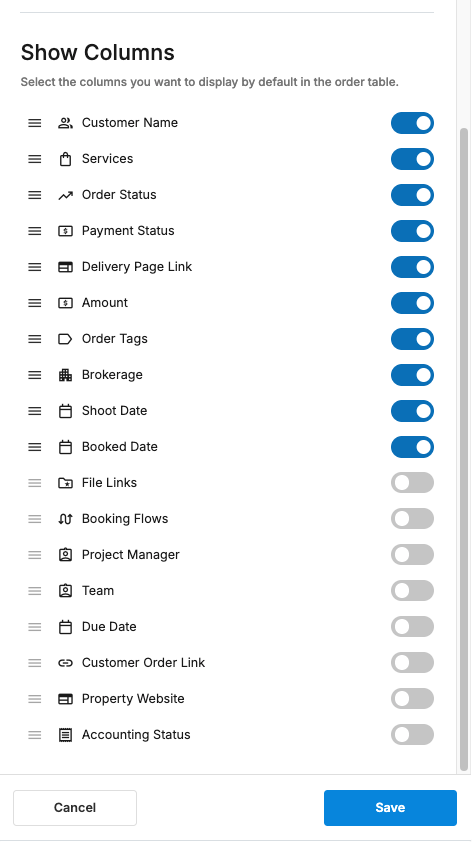
Hidden by default: Brokerage, Booking Flows, Project Manager, Team, Due Date, Customer Order Link, Property Website, Customer Tags and Accounting Status.
The Delivery Page Link column shows a cover photo thumbnail, so you can recognize a property at a glance.
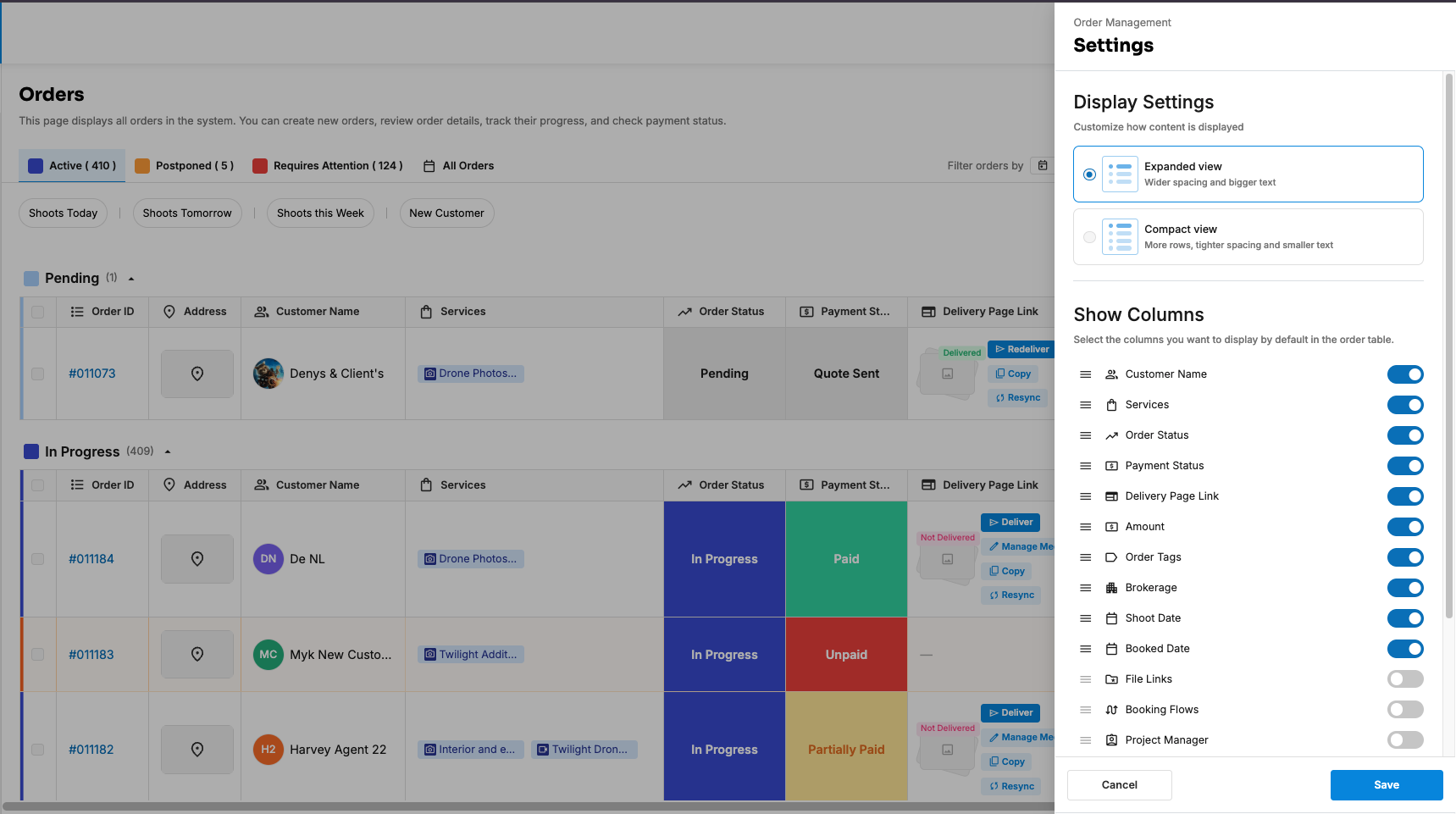
How do I choose my columns?
Go to Orders Management > Orders (Beta).
Click Settings next to the filters.
Under Show Columns, switch on the columns you want and switch off the ones you don't.
To change the order, drag a column by its handle (☰) up or down the list. Only columns that are switched on can be moved.
Click Save.
Can I make the table more compact?
Yes. In Settings > Display Settings, choose:
Expanded view: wider spacing and bigger text.
Compact view: more rows, tighter spacing and smaller text.
Can I change a column's width?
Yes. Drag the edge of a column header to make it wider or narrower. The new width is saved with the rest of your layout.
Are my columns saved?
Yes. Your columns, their order, their widths and your view are saved to your user account, so:
the table looks the same after you log out and back in
it follows you to another browser or device
your changes don't affect anyone else on your team, and theirs don't affect you
Which columns are there?
Shown by default
Column | Shows, or lets you do |
|---|---|
Order ID (pinned) | Click to open Order Details |
Address (pinned) | The property address |
Customer Name | The customer, with a New tag on their first order. Click to see their phone and email. |
Shoot Date | When the shoot is |
Booked Date | When the order was placed |
Services | The order's services. Click to open Project Chat. |
Order Status | Change it right in the row |
Payment Status | Change it right in the row |
File Links | The Raw Files, Final Files and Uploaded files folders, with a warning if folders are unsynced or couldn't be created. Final Files isn't shown if your portal delivers through Direct Upload instead of a Dropbox delivery folder. |
Delivery Page Link | A cover thumbnail, plus Sync Files, Deliver/Redeliver and Copy |
Amount | The order total |
Order Tags | The order's tags. Click to add, create or edit tags. |
Hidden by default (switch on in Settings)
Column | Shows, or lets you do |
|---|---|
Brokerage | The customer's brokerage |
Booking Flows | Which booking flow the order came from |
Project Manager | Assign who oversees the order |
Team | Assign the photographers and team |
Due Date | Set when the order is due |
Customer Order Link | The customer's order status page |
Property Website | The listing website, once enabled |
Customer Tags | The tags on the order's customer, for example VIP. Read-only here: you add them on the customer's profile. See How Do I Tag Customers in Tonomo? |
Accounting Status | Whether the order's invoice has synced to Xero or QuickBooks: Synced, Manually Synced, Unsynced or Out of Sync. Only listed when Xero or QuickBooks is connected. See How Do I Check an Order's Xero or QuickBooks Sync Status? |
Frequently asked questions
Which columns are best on a phone? Keep what you act on, for example Address, Shoot Date, Order Status and Delivery Page Link, and choose Compact view.
Where's the photo thumbnail? In the Delivery Page Link column, once the order's files have synced.
Why can't I see Project Manager or Team? They're hidden at first. Switch them on in Settings > Show Columns.
Why isn't Accounting Status in my list? It only appears when your portal has Xero or QuickBooks connected. Staff with limited access and contractors don't see it, or the Amount column, because they can't see invoice data.
Will my teammates see my columns? No. Each person's layout is saved to their own account.
Related articles